Since the launch of Dota 2 version 7.00 (a few weeks ago) became possible to write custom bot using an official API provided by Valve. The problem is: the documentation is really bad. AFAIK the only official information is this wiki page and the sub-forum on dev.dota2.com (but the community is growing strongly in reddit.com/r/dota2AI/). I’m not complaining though. They probably had to choose between launch the API with bad documentation or launch it later and I’m happy they launched it now. 🙂
Okay! So, the first thing you need to know is that all files you are going to create have to be on folder game/dota/scripts/vscripts/bots. Since I’m using a Mac, my complete path is /Users/Gustavo/Library/Application Support/Steam/SteamApps/common/dota 2 beta/game/dota/scripts/vscripts/bots but I believe on Windows it should be on Program Files/Steam or similar. On the vscripts folder you will have a folder named bots_example but not one named bots, then just create it and add the following file (hero_selection.lua):
-- hero_selection.lua

-------------------------------------------------------------------------

function Think()

    if ( GetTeam() == TEAM_RADIANT ) then
        print( "selecting radiant" );
        SelectHero( 0, "npc_dota_hero_pudge" );
        SelectHero( 1, "npc_dota_hero_axe" );
        SelectHero( 2, "npc_dota_hero_bane" );
        SelectHero( 3, "npc_dota_hero_bloodseeker" );
        SelectHero( 4, "npc_dota_hero_crystal_maiden" );
    elseif ( GetTeam() == TEAM_DIRE ) then
        print( "selecting dire" );
        SelectHero( 5, "npc_dota_hero_drow_ranger" );
        SelectHero( 6, "npc_dota_hero_earthshaker" );
        SelectHero( 7, "npc_dota_hero_juggernaut" );
        SelectHero( 8, "npc_dota_hero_mirana" );
        SelectHero( 9, "npc_dota_hero_nevermore" );
    end

end

-------------------------------------------------------------------------
If you are new to Lua scripting language I recommend this quick tutorial. As you can imagine, this file will be used for heroes selection. This one is pretty simple. It just picks the very same team every time. It will even pick your (not bot) hero. In this file you can create complex logics to pick counters and heroes that works good with others, but for now this is enough. Let’s see if everything is fine so far? To test it just open your Dota 2 game, go to Play Dota -> Create Lobby and then Edit on Lobby Settings. Make sure your Server Location is set to Local Host, fill empty slots with bots is marked and both Radiant Bots and Dire bots are set to Local dev script:
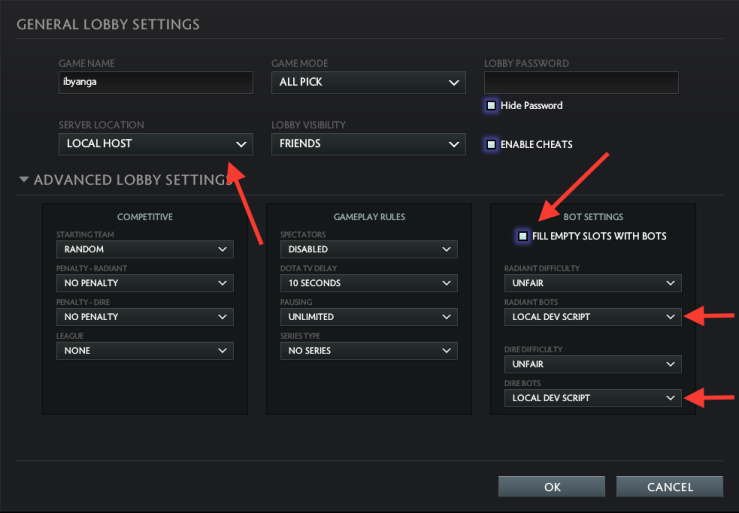
Start the game and all heroes should be selected automatically. You can try to change the name of the picks or remove the SelectHero(0… so you can handpick your hero (supposing you are playing on first slot in radiant). Now, someone might ask: “Wait a minute! If my bots folder has only the script to pick the heroes, how can it be that they are playing by themself even though I haven’t a script to tell them what to do?” Well, in fact you don’t have scripts for any custom behavior, therefore, on their absence, all bots fallback to a default implementation.
Now you can run your own scripts, let’s start to actually modify the behavior of the bots. You can create custom behaviors in 2 ways: by completely taking control over bots individually or by overriding specific behaviors and/or decision-making to be used by the default system. In the former you are responsible for each and every action of the bot but in the latter you can override just some parts and leave the default behavior for everything else. Since I’m starting to learn, I decided to begin by taking over control of a specific but and just move him around to make sure I get familiar with syntax, some functions and etc.
In order to completely control a bot, you just need to have a file named bot_NAME.lua with a function Think(). For my bot, all I did was to make him run in circles around the fountain. Here is the code:
-- bot_axe.lua

--------------------------------------------------------------------------------

local fountainLocation = Vector(-5923.0, -5337.0, 384.0);
local fountainRadius = 400.0;

--------------------------------------------------------------------------------

function Think()

	local npcBot = GetBot();

	local angle = math.rad(math.fmod(npcBot:GetFacing()+30, 360)); -- Calculate next position's angle
	local newLocation = Vector(fountainLocation.x+fountainRadius*math.cos(angle), fountainLocation.y+fountainRadius*math.sin(angle), fountainLocation.z);
	npcBot:Action_MoveToLocation(newLocation);
	DebugDrawLine(fountainLocation, newLocation, 255, 0, 0);

end

--------------------------------------------------------------------------------
I won’t go through all the math here but basically what this code does is: at every frame, it gets a reference for the current bot (GetBot), calculate the angle with origin in the fountain for the next location based on what angle the bot is facing (local angle), calculate the location he should go (local newLocation) and then gives the action to move (npcBot:Action_MoveToLocation(newLocation)). Since the bot will walk around the fountain, he will always change his angle and thus the location he needs to go. I also draw a debug line to visually see where is the next location the bot is trying to go. But be aware, as you move your camera the debug line moves in a weird way that I don’t understand yet.
Run your custom game and Axe should be running non-stop around the Radiant’s Fountain. And that is it for now. You can find these files on my repository. Next, I will try to make a new bot playable (maybe Pudge…?)


 Gustavo's Blog